Documents saga a2ui 0.11.0-rc.1 (prerelease). This is the SDK guideSAGA connects an application’s UI to an MCP host. Your application supplies the view, the meaning of its data and the actions its controls perform. A stack package connects the renderer to MCP delivery and manages the view’s lifetime. React and Lit are both supported renderer choices. Install the published MCP stack and peers for your application’s framework; both stacks provide custom typed surfaces, actions and FaithfulCard applications. For a generated starter or local demonstration, use the source checkout and its matched candidate tarballs. The source CLI offers Lit templates on five servers and one React template, on Hono; the local demonstration is Lit only. This is a tooling distinction, not a ranking of the two stacks.docs/getting-started.mdat source revisionfb4126c. It is published as a snapshot: later source changes do not alter it. Licensed under Apache-2.0.
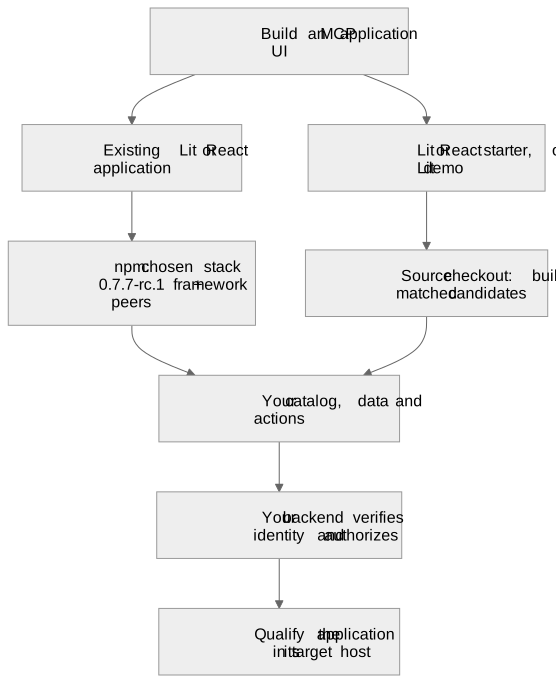
Choose a track
Choose the application you want to build. Each track includes its own setup steps.
If you are unsure, read the React track first. Its ideas carry over: the layout, the operations and the conversation message do not depend on the renderer.
Prerequisites
- Node and npm. An application that installs the published packages needs Node 22.12.0 or newer. This repository’s checkout needs 22.23.3 or newer (
.nvmrc). - A bundler that handles TypeScript source. The packages export source rather than precompiled JavaScript.
- A checkout of this repository for
saga init, the candidate tarballs and the examples. Runnpm ciin its root. - An MCP host is optional while you build. The demonstration and the examples have local stand-ins for one. The React tutorial uses Claude or ChatGPT from its first UI step; the Lit demonstration can run locally. See host compatibility for other host behavior.
Install a published stack
The current seven-package release set is an RC published undernext: @saga-a2ui/react-mcp-stack is 0.8.1-rc.1, and the other six packages are 0.8.0-rc.1. Pin these exact versions rather than relying on mutable tags. The release receipt records the source revision, registry integrity and anonymous installation checks. See public installation for registry checks and package selection.
Use Node 22.12.0 or newer and a bundler that handles TypeScript source. The packages export source rather than precompiled JavaScript. This registry path configures an existing application; the local demonstration in the Lit track is the quickest way to see a complete view before integrating your own backend. In your application’s root package.json, merge this override with your existing settings before installing:
/faithful-card for the optional card application and /server for server integration. Import server code only in the server build. Installing the package does not create a project, start a backend or register an application with a host.
The React integration guide shows how to open, mount, update and dispose a typed surface in an existing React application. For MCP delivery, the application still needs its own catalog, result handling and backend; this install section does not create those files or promise a running host connection. The view-composition example shows a complete application using the stack. It is a development example, not a React saga init template.
Which packages do what
Package names are flat under@saga-a2ui. There are no aggregate packages: no @saga-a2ui/genui, protocol, transport or tools. Groups exist only in the documentation (package layout).
Renderer packages keep their own framework peers and lifecycle APIs. Each maintained source starter declares its stack and the matching SDK packages explicitly, imports its view from
@saga-a2ui/lit-mcp-stack (the Lit starters) or @saga-a2ui/react-mcp-stack (the React starter), and uses the lower-level @saga-a2ui/mcp/server registration API on its server. This is the starters’ existing source composition. For a new stack application, use the stack exports described above; you do not need to copy those direct SDK dependencies.
Component, definition, template and instance
A repeated list can have several buttons with the same layout ID. Each button still needs to act on its own row. The action binding design distinguishes the layout declaration from the rendered instance and the data it currently shows:
The layout gives the markup its IDs and structure and names no action. Behavior is decided by application code. A reusable fluent action definition (
Action.local(...) or Action.server(...), finished with .build()) holds no pending state, so one definition can be attached to every instance. Setup finds instances by the layout’s own ID (watchById), and bindAction('activate', definition) attaches the definition to that exact instance (or renderer-owned handle). Each attachment keeps its own state, so two rows pending at once stay apart. Discovery happens at setup, once per presented surface; nothing looks an action up by a string at activation time, and no handler-name table, event bus or registry exists.
The bind-action snippet in the generated recipes is the starter’s own attachment.
Create a new project
This is the source-based path for a Lit or a React view. From the checkout root, runnpm ci if its dependencies are not already installed.
saga init is a script in this repository, run from a checkout. It creates one new directory from the maintained starter template and installs nothing, runs no package manager and no hook, and never changes anything that already exists.
repository
--a2ui-stack selects the renderer/delivery combination; --server selects the server framework. The commands create my-app (a Lit view) and my-react-app (a React view on @saga-a2ui/react-mcp-stack with React 19.3.1); both serve it from Hono and install nothing. The steps below use the Lit project, and what differs for React is noted where it matters. The React track creates a separate app directly from npm packages and does not require this source workflow. Use Node 22.23.3 or newer for this source checkout. Keep this checkout unchanged while exporting the project and packing its dependencies so their candidate identities match.
Install the packages from a candidate
This source workflow qualifies the checkout using candidate builds of the renderer and its stack (Lit and the Lit stack, or React and the React stack). The packages are also published on npm. The projectsaga init creates depends on @saga-a2ui/* packages pinned to the exact candidate version of the commit that produced them. A package manager resolves those pins only from that candidate’s tarballs, so a plain npm install cannot resolve those commit-specific candidate versions from the public registry.
Build the candidate from the checkout that ran saga init, then install the tarballs the project uses in one command:
repository
candidate-out/packages/saga-a2ui-<package>-<version>.tgz for the seven packages. Then open a terminal in my-app and install all five tarballs together. PATH must point back to the checkout’s candidate output from that directory:
PATH and VERSION with your files; the version is the one in the project’s package.json. A React project installs the five React-side tarballs instead (core, components, react, mcp and react-mcp-stack, from the same candidate-out/packages directory). A plain npm install cannot retrieve these candidate versions from npm; install their tarballs instead. A public release does not replace the matched candidate set used by this source workflow. A candidate is not a public registry release. Install every package of the combination you use together, from the same candidate, and keep the @a2ui/markdown-it override in your root package.json (the starter carries it). Candidates: contents, update, rollback is the authority for the matched set, the update sequence and rollback; do not update one package alone. CI also uploads each candidate as a workflow artifact.
After installing those tarballs inside my-app, build and start it:
project
npm run typecheck checks the view and the server. npm start prints two endpoint addresses: /status/mcp is public and reads no credential; /account/mcp is protected. The protected endpoint refuses every credential until you replace server/verifier.ts. The starter ships no identity provider and no account, sample data or test verifier. These addresses are MCP endpoints, not browser pages. The server is ready when it prints them. Connect an MCP Apps-capable host to the public /status/mcp endpoint and invoke its get_status tool to request the starter view. A remote host needs a reachable application address; starting a loopback server does not deploy it. For an immediately viewable local application without host setup, use the demonstration. The template README lists the files that are yours.
HTTP defaults
Use stateless MCP and prepare the built view once at startup. The six maintained starters each construct two persistentcreateMcpHandler instances: one for the public status endpoint and one for the protected account endpoint. Each factory constructs a fresh server for a request. Each handler owns a separate notification bus, subscription limit and shutdown operation, so public subscribers cannot receive protected endpoint notifications or consume its subscription slots.
The Hono target uses the official @modelcontextprotocol/hono validation middleware and Hono’s Node adapter. Hono supplies routing and middleware; Node remains the runtime. Its routes mount handler.fetch(c.req.raw, { parsedBody, authInfo }); Node, Express and Fastify use the official toNodeHandler adapter. The application authenticates before invoking the protected handler and reads the body under the request’s deadline. All mounting paths pass parsedBody explicitly: in the pinned SDK this preserves the original Request object in both modern and legacy factories, allowing the endpoint’s WeakMap to recover the admitted lifetime through ctx.requestInfo.
When deploying behind an ingress, configure both Host and Origin validation for the clients you accept. Allowing a public Host does not make a remote browser Origin pass localhost-only Origin validation; use an explicit trusted-origin policy when accepting those requests.
Response modes and slow tools
For modern requests, leaveresponseMode unset ('auto'):
SAGA’s
request.reportProgress(...) emits progress only when the client supplied a progressToken. A slow call without a related message remains JSON in auto; elapsed time alone never starts streaming. The SDK’s keepAliveMs defaults to 15,000 milliseconds (0 disables it), and in auto starts only after SSE upgrade. Configure the application’s request and operation budgets, proxy timeouts and response mode for the work it actually performs; keepalive does not extend those budgets.
These modes describe the modern path. The pinned handler’s default compatibility path serves 2025-era clients with a fresh stateless transport per request and SSE responses. It retains the older initialization exchange but creates no protocol session; GET and DELETE return 405. No opt-in is needed to serve 2026-07-28 alongside that compatibility path. See the upstream handler reference.
Protocol state and notifications
The 2026-07-28 specification removes protocol sessions, the initialization handshake and SSE replay. Modern requests carry their protocol version and capabilities in_meta; clients re-issue a request after a broken stream. An old session map or replay store does not belong in a new request/answer application.
- Keep cross-call application state behind explicit server-minted handles passed as ordinary tool arguments.
- For additional input, use the multi-round-trip pattern: return
resultType: "input_required"with input requests and request state, then accept the client’s retry withinputResponses. Do not describe older server-initiated requests as a reason to introduce sessions. - Long-running background work can use the separate
io.modelcontextprotocol/tasksextension when both application and client support it. The starters do not implement a task workflow. subscriptions/listenis an opted-in POST response stream for change notifications. Request progress and logging stay on their own request’s response stream. Subscription streams and ordinary long-running SSE responses both hold HTTP connections.- The default subscription bus is in-process and
maxSubscriptionsdefaults to 1024 per handler. A multi-replica application using notifications needs a shared pub/sub implementation within the same authorization boundary. These fixed starter operations publish no change notifications.
isLegacyRequest ahead of a modern handler configured with legacy: 'reject'; that is a separate migration choice.
Startup, view identity and shutdown
Read and validate the built HTML before listening. ComputeviewUriForHtml(finalHtml, 'index.html') once and retain the immutable OperationView used by discovery, tool results and resource reads. A URI such as ui://views/index.<32-character-sha256-prefix>.html identifies both the file and its final bytes. Rebuilding the document changes its address automatically, while identical filenames and bytes agree across replicas. Full SHA-256 checksums remain available in qualification records. Answer-specific data never enters this cached document.
On SIGINT or SIGTERM, the starter stops admission, cancels active request lifetimes, closes both persistent MCP handlers, then closes the Node HTTP listener and connections. handler.close() aborts modern exchanges and subscription streams; legacy exchanges also need request/connection teardown. The Hono Node guide likewise makes the application’s underlying HTTP server responsible for shutdown.
The CLI creates a separate reference project; it does not migrate an existing application. Preserve your own operations, renderer and policy when adapting its HTTP layer. A Lit starter does not require an existing React application to change renderer.
Unqualified pairs are refused
saga init offers only the pairs CI qualifies and that its own list names: lit-mcp on node, express, fastify, hono and hapi, and react-mcp on hono. Asking for another pair exits with status 1 before anything is written, and the message lists the six supported ones:
repository
saga init offers today (all six). Hapi uses the SAGA-maintained bridge over the official Node/server SDK; React has one starter, on Hono, and no saga init pair on any other server.
Attach to an existing backend
Attaching SAGA to a server you already run is a documented integration you make in your own source. No command performs it, and the CLI never edits an existing application. The recipes are in Attach SAGA to an existing backend. That document is generated from the same maintained, CI-qualified template filessaga init copies, so an authentication or server snippet is the starter’s own text, and a server that is not yet qualified has no recipe. To print the same snippets yourself:
repository
npm run guide:recipes); scripts/guide.test.ts fails until they do. The Hapi recipe traces its route authentication through the request factory and transport to the verified-identity hook. Each application supplies its verifier and authorization policy.
Troubleshooting setup
Candidate packages cannot be found on npm. The Lit starter pins commit-specific candidate versions. Build and install the matched tarballs, rather than replacing those pins with independently selected public packages. The CLI’s genericnpm install next step does not do this for you.
The protected endpoint refuses your credentials. Replace server/verifier.ts with your application’s verifier and supply its authorization policy. The clean starter deliberately has no test account or identity provider. The public /status/mcp endpoint can work while /account/mcp correctly refuses access.
The demo directory does not exist. The demonstration is built, not downloaded. Run npm run build:demo in the source checkout first. It produces the standalone directory whose own npm start serves the demonstration. The standalone demo supports Node only; the other server targets are starter templates.
A React starter command on another server is refused. The React stack is published and saga init offers react-mcp on hono only. For another server, integrate the stack in a React application; do not replace its lifecycle with a Lit-specific lifecycle or follow the retired historical Lynx fixture as a setup path.
Where to go next
- Choose a track: Build tic-tac-toe with React or Build the notes application with Lit.
- The attach recipes: Attach SAGA to an existing backend.
- The command that creates a project, and its safety rules:
scripts/saga.tsand the “Creating a project withsaga init(CLI1)” section of the development reference. - The action contract in depth: the action binding design and The action contract across the current codebase (ACT7).
- What is implemented and what is not, and the evidence behind each claim: the Lit track.
- The design this guide implements: the application setup Blueprint and the getting-started tracks Blueprint.